Skip to content
Design Manager

How to swap HubSpot blog templates

How to swap blog templates in 5 quick steps.

Unlike site or landing pages that now support drag-and-drop page editor, HubSpot blogs are still template-dependent. Meaning the layouts are fully controlled by the templates (HTML and hubL-based).

Here are the steps to swap your blog templates:

  1. Open Content Settings
  2. Choose Website > Blog
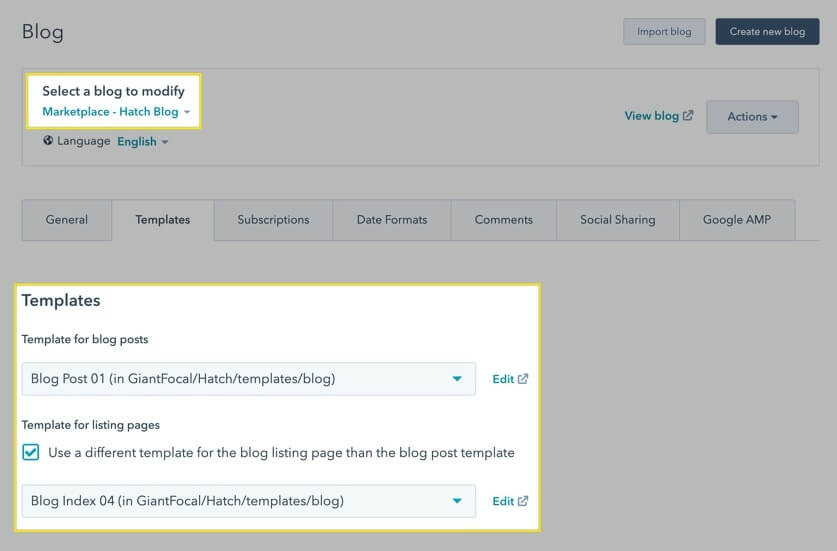
  3. Choose the blog you're editing
    swap-blog-templates
  4. Click the Templates tab
  5. Click the Template for blog posts and Template for listing pages choice fields.
    For example, if you're applying Hatch theme's blog templates, you can search for "Hatch" in the search fields. 
  6. Save

Was this guide helpful?

One click — we read every signal and tighten what's confusing.

Thanks — noted
HubCrafted · subscription HubSpot team

Your portal backlog outruns your team. HubCrafted clears it.

HubCrafted is your HubSpot team on subscription. Pages and landing pages, custom modules and themes, email and sequences, workflows, reports, integrations. One active task at a time, unlimited queue, unlimited revisions. One flat monthly fee, no project SOWs, no hourly meter. Built for in-house teams on HubSpot Pro or Enterprise who won't staff a full-time HubSpot developer.

From $2,950 / month Pause anytime Async + Loom