Skip to content
FAQ

Can I make changes to the HubSpot theme?

Yes, you can, but you'll need to clone or create a child theme.  You can right-click on the theme in Design Tools you wish to edit to do so. 
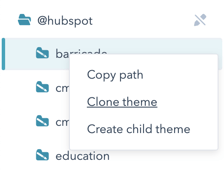
Yes, you can, but you'll need to clone or create a child theme. 

You can right-click on the theme in Design Tools you wish to edit to do so. 

If you're cloning the theme, it's an entirely new theme instance that's wholly disconnected from the original theme. 

On the other hand, a child theme inherits all of the files, modules, and templates from the original theme unless there is an instance that overwrites them within the child theme folder. 

If you purchase a theme from the HubSpot marketplace, we recommend creating a child theme instead of cloning it. By doing so, you'll still get all future theme updates. 

Was this guide helpful?

One click — we read every signal and tighten what's confusing.

Thanks — noted
HubCrafted · subscription HubSpot team

Your portal backlog outruns your team. HubCrafted clears it.

HubCrafted is your HubSpot team on subscription. Pages and landing pages, custom modules and themes, email and sequences, workflows, reports, integrations. One active task at a time, unlimited queue, unlimited revisions. One flat monthly fee, no project SOWs, no hourly meter. Built for in-house teams on HubSpot Pro or Enterprise who won't staff a full-time HubSpot developer.

From $2,950 / month Pause anytime Async + Loom